Sinergia is a free, open source, web based framework for developing help desk management solutions in NET 3.0
Wednesday, October 05, 2016
Kezmo, a tool for collaboration across organization borders
While this is not directly related to Sinergia, I need to share with you a bit of news. I've been working for the past year in a messaging platform that we've just released under the name Kezmo.
It's an enterprise chat platform, that can be used for team collaboration within the organization, but also it can be used for external collaboration, with clients and prospects. It can be used for helpdesk type of scenarios, since it supports storing structured information, such as issues.
It enables the creation of collaboration spaces, that take after Whatsapp groups in a way, and each space represents a pocket of independent context where team members, plus clients, providers, and whoever needs to be added to the loop can participate. Within these collaboration spaces, tasks can be assigned, issues can be raised, and notes, and links stored.
The user interface is meant to enable agile collaboration, allowing users to create tasks and issues directly from the chat interface. Additionally if more conservative users prefer to create tasks using a form, as usually provided by some tools, they can do so as well.
It's available in iOS, Android, and web for desktop.
It would help us a lot if you could try it, and provide feedback.
Labels:
crm,
customer management,
enterprise chat,
helpdesk,
issue management,
secure chat
Monday, October 20, 2008
Sinergia 0.6 released
Release notes
Framework update
Visual studio solution updated to framework version .NET 3.5 SP 1
Case Attachments
Support to attach files to cases included.
Calendar AJAX Control
Datetime fields now include Calendar AJAX controls, from the AJAX.NET control toolkit
DAAB->ADO.NET
Removed Data Access Block (Entlib) usage, replaced by plain ADO.NET
please try it, and do report any issues you might find.
Framework update
Visual studio solution updated to framework version .NET 3.5 SP 1
Case Attachments
Support to attach files to cases included.
Calendar AJAX Control
Datetime fields now include Calendar AJAX controls, from the AJAX.NET control toolkit
DAAB->ADO.NET
Removed Data Access Block (Entlib) usage, replaced by plain ADO.NET
please try it, and do report any issues you might find.
Saturday, April 07, 2007
Sinergia 0.4.2 released
Sinergia version 0.4.2 has been released, featuring:
* Users, and user roles management
* My profile
* My Cases
* Forgot your password?
As usual, download it, try it, and come back with feedback.
* Users, and user roles management
* My profile
* My Cases
* Forgot your password?
As usual, download it, try it, and come back with feedback.
Thursday, April 05, 2007
New Webcasts available
I've updated the webcasts page of the Sinergia Help Desk site.
There are two more videos, featuring Custom Enumerations creation, and Case Types creation and management.
I hope you find them helpful, any feedback is of course welcomed.
Sinergia Help Desk 0.4.1 released
There's a new version of the Sinergia Help Desk project, number 0.4.1. This time featuring:
* New support for Group Expressions. Now it's possible in the case type editor, to define visible, and read only, expressions for groups.
* New User Profile information support. Using the profile support provided by Membership ASP.NET 2.0, now it's possible to manage custom information of the created users. Sinergia profile stores FirstName, LastName and Phone.
* Case Type Editor bug fixes.
Sinergia 0.4.1 can be downloaded here.
* New support for Group Expressions. Now it's possible in the case type editor, to define visible, and read only, expressions for groups.
* New User Profile information support. Using the profile support provided by Membership ASP.NET 2.0, now it's possible to manage custom information of the created users. Sinergia profile stores FirstName, LastName and Phone.
* Case Type Editor bug fixes.
Sinergia 0.4.1 can be downloaded here.
Wednesday, April 04, 2007
New Sinergia Help Desk Google Group
After a number of interactions with some Sinergia users and developers I've realized that:
- The project is in need of some collaborative environment, ala wiki, to share knowledge, and learned lessons.
- Sourceforge forums haven't been really used
- I like Google Groups
I've created a Sinergia Help Desk Google Group, membership is of course free, and questions (and answers) are welcomed.
What are you waiting to join?
- The project is in need of some collaborative environment, ala wiki, to share knowledge, and learned lessons.
- Sourceforge forums haven't been really used
- I like Google Groups
I've created a Sinergia Help Desk Google Group, membership is of course free, and questions (and answers) are welcomed.
What are you waiting to join?
Thursday, March 29, 2007
Sinergia screencasts
Screencasts of some of Sinergia's help desk features are now published in the project's site. This is a work in progress, as soon as I create new screencasts I'll publish them.
So, please check them out and come back with feedback.
Wednesday, March 28, 2007
Sinergia 0.4.0 released
I'm happy to announce that Sinergia open source help desk version 0.4.0 has been released.
Its focus was:
- improving error logging support
- adding import/export case types feature. This feature will have a post on itself
- fixing windows service restart problem
As usual, you may download Sinergia's latest release from here.
cheers, gabo
Its focus was:
- improving error logging support
- adding import/export case types feature. This feature will have a post on itself
- fixing windows service restart problem
As usual, you may download Sinergia's latest release from here.
cheers, gabo
Sunday, March 25, 2007
Known Sinergia Issue Opening existing workflow instance after restarting windows service
I've spotted some days ago a bug in Sinergia.
If you create a new case, and then re start the Sinergia Workflow Window Service you will have problems editing the created case. But you'll be able to create new instances without problem.
I'll be working this week on this bug, in the meantime I've already started a new thread in Windows Workflow Foundation's forum, here it is if you want to take a look a t it.
Tuesday, March 13, 2007
Sinergia Help Desk FAQ
This FAQ is a work in progress, if you have any question not answered here, email me.
What are the required permissions to install sinergia?
Does Sinergia log errors?
I want to install Sinergia using a different SQL Server 2005 instance than .\SQLEXPRESS What should I do?
I can't login with the admin user. What's wrong?
where exactly can I change the default password and user names?
What do I have to do to customize the users and passwords of the Sinergia setup?
the last check in the diagnose tool fails, reporting lack of priviliges, but I'm logged in with local administrator. What's wrong?
what does this code generation do?
What are the defined Roles designed for?
I can't start the Sinergia.Workflow service. Each time I cleared the Event Log the service started! What's the problem?
I'm trying to compile, and I can't. What do I need?
What are the required permissions to install sinergia?
Does Sinergia log errors?
I want to install Sinergia using a different SQL Server 2005 instance than .\SQLEXPRESS What should I do?
I can't login with the admin user. What's wrong?
where exactly can I change the default password and user names?
What do I have to do to customize the users and passwords of the Sinergia setup?
the last check in the diagnose tool fails, reporting lack of priviliges, but I'm logged in with local administrator. What's wrong?
what does this code generation do?
What are the defined Roles designed for?
I can't start the Sinergia.Workflow service. Each time I cleared the Event Log the service started! What's the problem?
I'm trying to compile, and I can't. What do I need?
What are the required permissions to install sinergia?
The setup must be ran with local administration priviliges
Does Sinergia log errors?
Yes, they are logged in the Event Log. You can find it in:
Start>Administrative Tools>Event Viewer>Application
Yes, they are logged in the Event Log. You can find it in:
Start>Administrative Tools>Event Viewer>Application
I want to install Sinergia using a different SQL Server 2005 instance than .\SQLEXPRESS What should I do?
To modify the SQL Server instance used by Sinergia you must:
1. Find and replace all the ocurrences of .\sqlexpress in the *.bat files of the installation folder (C:\Program Files\GLR\Sinergia)
2. Find and replace all the ocurrences of .\sqlexpress in the web.config file in the folder of the website C:\Inetpub\wwwroot\Sinergia\Web
3. Find and replace all the ocurrences of .\sqlexpress in the config file, C:\Program Files\GLR\Sinergia\workflow\Sinergia.WWF.Host.exe.config
4. Edit all enumerations, with data source type SQL, and modify the connection string defined updating it to the new SQL Server instance.
To modify the SQL Server instance used by Sinergia you must:
1. Find and replace all the ocurrences of .\sqlexpress in the *.bat files of the installation folder (C:\Program Files\GLR\Sinergia)
2. Find and replace all the ocurrences of .\sqlexpress in the web.config file in the folder of the website C:\Inetpub\wwwroot\Sinergia\Web
3. Find and replace all the ocurrences of .\sqlexpress in the config file, C:\Program Files\GLR\Sinergia\workflow\Sinergia.WWF.Host.exe.config
4. Edit all enumerations, with data source type SQL, and modify the connection string defined updating it to the new SQL Server instance.
I can't login with the admin user. What's wrong?
This happens when running Sinergia from within Visual Studio. To be able to run Sinergia from Visual Studio do the following: Open the Sinergia_aspnet database, go to the aspnet_Membership table. Replace the cells with value /Sinergia/Web, with value /Web
where exactly can I change the default password and user names?
Users, and their passwords are added to the membership database through the Membership_Users.sql script in the resources folder of the Visual Studio solution. The product does not include user management features, the reason for this is that its based on the ASP.NET Website configuration tool provided out of the box by Membership asp.net. You can access it with the Website/ASP.NET Configuration menu option of the Visual Studio IDE, when the web project is selected. This is the tool provided to manage user, roles, and passwords. Unfortunately there is no way to open the web version witout a Visual Studio installation. Check out this article regarding this ( http://www.developer.com/net/asp/article.php/3569166)
What do I have to do to customize the users and passwords of the Sinergia setup?
If you want to change the password you have to do the following steps:
1 - Create a user with the ASP.NET Website configuration tool
2 - Open the Sinergia_aspnet database, go to the aspnet_Membership table. This table contains users, and their passwords data.
3 - Copy the password text of the row whose email matches the one you entered in 1
4 - Paste the password text in line 5 of the Membership_User.sql script
5 - Copy the password salt text of the row whose email matches the one you entered in 1
6 - Paste the password salt text in line 6 of the Membership_User.sql script
Basically this means, Membership uses some algorithm to hash the entered password, copying the hashed value into the create user script works. I think it Membership can be configured no to encrypt the user's password into the database, but that's not the default setup.
If you want to change the password you have to do the following steps:
1 - Create a user with the ASP.NET Website configuration tool
2 - Open the Sinergia_aspnet database, go to the aspnet_Membership table. This table contains users, and their passwords data.
3 - Copy the password text of the row whose email matches the one you entered in 1
4 - Paste the password text in line 5 of the Membership_User.sql script
5 - Copy the password salt text of the row whose email matches the one you entered in 1
6 - Paste the password salt text in line 6 of the Membership_User.sql script
Basically this means, Membership uses some algorithm to hash the entered password, copying the hashed value into the create user script works. I think it Membership can be configured no to encrypt the user's password into the database, but that's not the default setup.
the last check in the diagnose tool fails, reporting lack of priviliges, but I'm logged in with local administrator. What's wrong?
This represents lack of priviliges to write in the sinergia/web/restricted/controls/generated, and sinergia/web/App_Code folders by the process running the website. This can be fixed assigning permissions to the IIS_WPG workgroup, and the Internet Guest Users account (at least in Win2k3).
what does this code generation do?
When a Case Type is set as default, by clicking the Make default link with a selected case type files are generated (also when clicking the generate files link). What's generated? A user control which is placed dynamically in the case form, along with a datatype class which is used to carry data to and from the database, to the form.
What are the defined Roles designed for?
Administrator, has priviliges to do everything.
Manager, can: open, edit, and update cases, as well as view reports.
Technician, has priviliges to: open, edit, and update cases'status.
Users without role have priviliges only to open cases, and edit them.
Administrator, has priviliges to do everything.
Manager, can: open, edit, and update cases, as well as view reports.
Technician, has priviliges to: open, edit, and update cases'status.
Users without role have priviliges only to open cases, and edit them.
I can't start the Sinergia.Workflow service. Each time I cleared the Event Log the service started! What's the problem?
This may be due to the configuration of the Event Log logfile. You should make sure it's configured to overwrite events as needed.
Labels:
faq
Sunday, March 04, 2007
Diagnose setup problems tool
After a long hiatus there's a new release of the Sinergia Help Desk project.
The 0.3.7 version improves error logging, and includes a new tool to diagnose if a setup is ok, trying the most important features independently.
So if you install this version you should see a new link in the Login page. Something like this:
Following this link should lead to this page, where you can test every feature needed for a correct execution of the Sinergia web application.
With this tool you know from scratch if something is going wrong, and maybe even a hint about how to fix it.
I hope you find it helpful.
The 0.3.7 version improves error logging, and includes a new tool to diagnose if a setup is ok, trying the most important features independently.
So if you install this version you should see a new link in the Login page. Something like this:
Following this link should lead to this page, where you can test every feature needed for a correct execution of the Sinergia web application.With this tool you know from scratch if something is going wrong, and maybe even a hint about how to fix it.
I hope you find it helpful.
Sunday, October 22, 2006
Before the alpha release
Long time, no see. I've been a bit busy with life, so there haven't been any releases as of latetly.
I've been working on the Visual Designer for Sinergia. I had been waiting for a web visual designer from the WF team but there is no sign it will be coming anytime soon. So now I'm working on a Windows Application Sinergia Workflow designer, based on Lab 10, of the Beta 2 Hands On Labs. The idea is to be able to design and save as xoml the workflow, and upload it to the Sinergia installation, associating Case Types with a custom workflow, enabling customization support at the data structure and process levels.
I'm also working on a Sinergia activities library to make it easier to customize the workflow process.
Another feature coming is case attachments support, which is under construction.
If you'd like to see any other feature included in Sinergia email me here.
I've been working on the Visual Designer for Sinergia. I had been waiting for a web visual designer from the WF team but there is no sign it will be coming anytime soon. So now I'm working on a Windows Application Sinergia Workflow designer, based on Lab 10, of the Beta 2 Hands On Labs. The idea is to be able to design and save as xoml the workflow, and upload it to the Sinergia installation, associating Case Types with a custom workflow, enabling customization support at the data structure and process levels.
I'm also working on a Sinergia activities library to make it easier to customize the workflow process.
Another feature coming is case attachments support, which is under construction.
If you'd like to see any other feature included in Sinergia email me here.
Monday, September 11, 2006
Sinergia Expressions
Sinergia Help Desk has been designed to support customization at the data level. Part of this customization support involves the capacity to determine group, and field properties, dinamically. For example whether a custom field is required in a certain workflow state, or when the case is edited by some user in a specific role, like say "Administrator".
Sinergia supports expressions to calculate group, and field properties dinamically. The properties that can be defined using expressions are: Required, Read Only, Visible, and Default Value.

This "expressions" are in fact expected to be C# code, plus a set of additional keywords targeted to simplify the expressions development. For example the [STATUS] identifier references (as the name implies), the state the case is in. Other expressions are [TODAY], and [NOW], which are usefull to define default values.
The expressions run in a context that has available the Session , User, and CaseData objects, which in my opinion allow for very powerfull expressions.
If I wanted to define a field as required always I can just put true, in the required expr textfield (is case sensitive remeber that).
If I wanted to check on the subject, to define the visible property, I could reference it using: [CASE].Subject, and if I want to make sure some word appears on the subject I could do something like this: [CASE].Subject.IndexOf("Whatever") != -1
Each expression textfield has a tick image button to validate the expression defined.
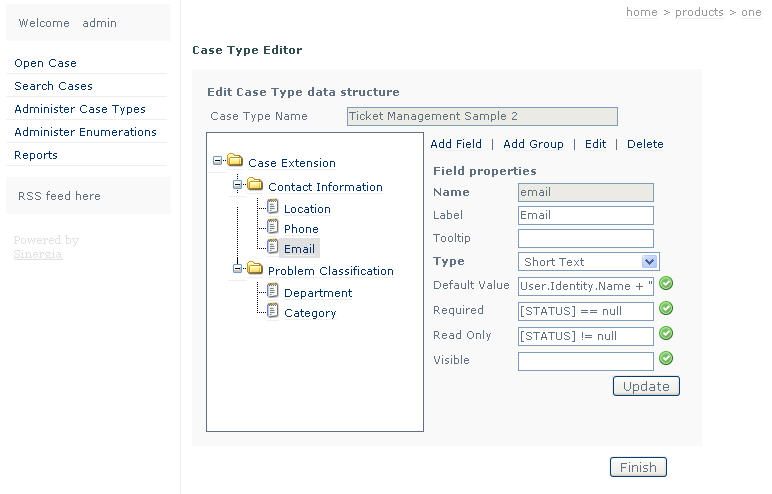
To try this feature you should go to the Administer Case Types, Administrator menu option, and edit one line of the grid with the edit icon (the one like a notebook).
You can download the latest bits, or you can try this in the demo here.
Sinergia supports expressions to calculate group, and field properties dinamically. The properties that can be defined using expressions are: Required, Read Only, Visible, and Default Value.

This "expressions" are in fact expected to be C# code, plus a set of additional keywords targeted to simplify the expressions development. For example the [STATUS] identifier references (as the name implies), the state the case is in. Other expressions are [TODAY], and [NOW], which are usefull to define default values.
The expressions run in a context that has available the Session , User, and CaseData objects, which in my opinion allow for very powerfull expressions.
If I wanted to define a field as required always I can just put true, in the required expr textfield (is case sensitive remeber that).
If I wanted to check on the subject, to define the visible property, I could reference it using: [CASE].Subject, and if I want to make sure some word appears on the subject I could do something like this: [CASE].Subject.IndexOf("Whatever") != -1
Each expression textfield has a tick image button to validate the expression defined.
To try this feature you should go to the Administer Case Types, Administrator menu option, and edit one line of the grid with the edit icon (the one like a notebook).You can download the latest bits, or you can try this in the demo here.
Tuesday, September 05, 2006
Sinergia online demo
In a time limited trial experience, I'm hosting a demo version of Sinergia at http://sinergia.dnsdojo.com/sinergia/web.
Before you try it, I'd like to clarify two things. The first, the host server may be down at times. If you want to make use of it and it's down, you may contact me and I'll bring it up. The second, the Administration features, are meant to be used in an intranet scenario, where the response times, are much better than these.
Having said this, I hope you enjoy it. As usual, feedback is welcomed.
Before you try it, I'd like to clarify two things. The first, the host server may be down at times. If you want to make use of it and it's down, you may contact me and I'll bring it up. The second, the Administration features, are meant to be used in an intranet scenario, where the response times, are much better than these.
Having said this, I hope you enjoy it. As usual, feedback is welcomed.
Sinergia 0.3.6 released
The weekly drop of Sinergia is out, and running. I'm very excited about some of the new features that ship with this version, in particular the new expressions support.
The release notes are:
1- Sinergia Expressions Support in Case Type definitions. Now it is possible to define expressions for calculating visible, read only, required, and default value field properties. This is just the title, I expect to post an article on the subject soon.
2- Integrated create new user wizard, to the login page.
I know that some of you are having issues to setup the product, If you experience any problem don't hesitate to contact me.
The release notes are:
1- Sinergia Expressions Support in Case Type definitions. Now it is possible to define expressions for calculating visible, read only, required, and default value field properties. This is just the title, I expect to post an article on the subject soon.
2- Integrated create new user wizard, to the login page.
I know that some of you are having issues to setup the product, If you experience any problem don't hesitate to contact me.
Tuesday, August 29, 2006
Sinergia 0.3.4 released
This version is a weekly update over the former one, the 0.3.2.
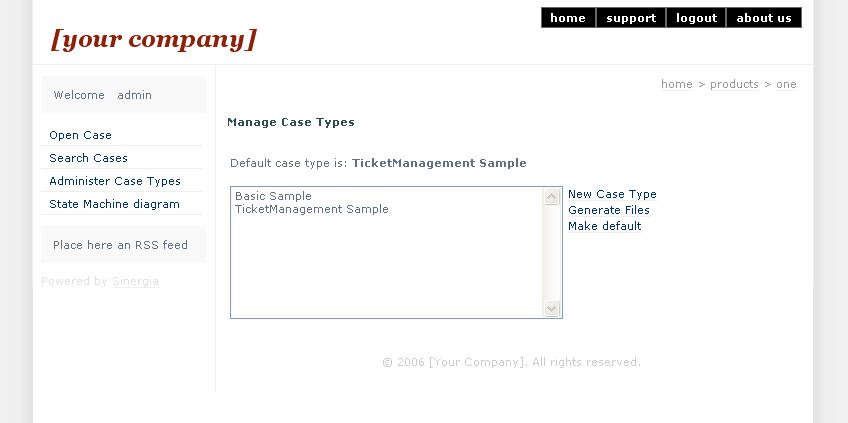
I've been working on improving the Case Type administration features. As a consequence now it's possible to edit Case Types. The Generate Files menu option has been removed from the Case Types Administration page, now the Make Default is responsible for doing the file generation thing.
There are issues associated with running the webapp with a low priviliged identity, since it intends to create files on the App_Code folder, it requires write permissions over this directory, which don't exist by default.
I've also activated the Create new user link, in the login page. Users created by this means have no roles, and can only open cases, and confirm proposed solutions.
As usual, you may download the latest version from here.
I've been working on improving the Case Type administration features. As a consequence now it's possible to edit Case Types. The Generate Files menu option has been removed from the Case Types Administration page, now the Make Default is responsible for doing the file generation thing.
There are issues associated with running the webapp with a low priviliged identity, since it intends to create files on the App_Code folder, it requires write permissions over this directory, which don't exist by default.
I've also activated the Create new user link, in the login page. Users created by this means have no roles, and can only open cases, and confirm proposed solutions.
As usual, you may download the latest version from here.
Tuesday, August 22, 2006
Sinergia 0.3.2 released, featuring Custom Enumerations
There's a new release of the pre alpha version of Sinergia. The main new feature is Custom Enumerations Support. In the following section I will introduce the Custom Enumerations concept in the Sinergia product.
For each field defined in the Case Type creation, a control type must be specified. The default value is 'Short Text', another possible value is 'Enumeration Select'. Selecting the latter allows binding the control to an existing Custom Enumeration.
Case Enumerations can be defined with the new admin menu option Administer Enumerations.
The data source of a Custom Enumeration can be one of three:
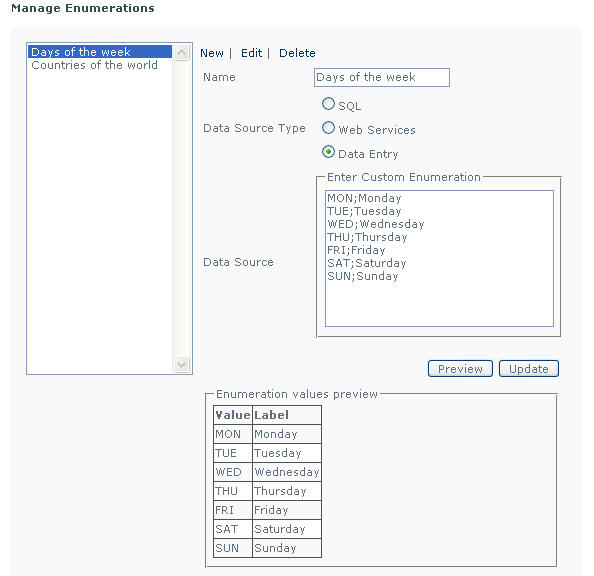
1 - Manually entered values. Value;Label rows, separated by end of line character.
2 - SQL Query over a database. Connection and SQL statement must be defined.
3 - Web Service invocation. In this case the url of the WSDL, the service and operation must be configured.
Once it's defined is possible to preview the list of values generated by the specified Enumeration. This can be achieved with the preview button.
The current version support only parameterless sql queries, and web service invocations.
You may download it from here.
Custom Enumerations
In the previous post, we saw the way to customize the data contained in the Case form (aka Case Types). Custom Enumerations is the support that allows Case Type's custom fields to take values from lists.For each field defined in the Case Type creation, a control type must be specified. The default value is 'Short Text', another possible value is 'Enumeration Select'. Selecting the latter allows binding the control to an existing Custom Enumeration.
Case Enumerations can be defined with the new admin menu option Administer Enumerations.The data source of a Custom Enumeration can be one of three:
1 - Manually entered values. Value;Label rows, separated by end of line character.
2 - SQL Query over a database. Connection and SQL statement must be defined.
3 - Web Service invocation. In this case the url of the WSDL, the service and operation must be configured.
Once it's defined is possible to preview the list of values generated by the specified Enumeration. This can be achieved with the preview button.
The current version support only parameterless sql queries, and web service invocations.
You may download it from here.
Friday, August 04, 2006
Help Desk Case data structure customization
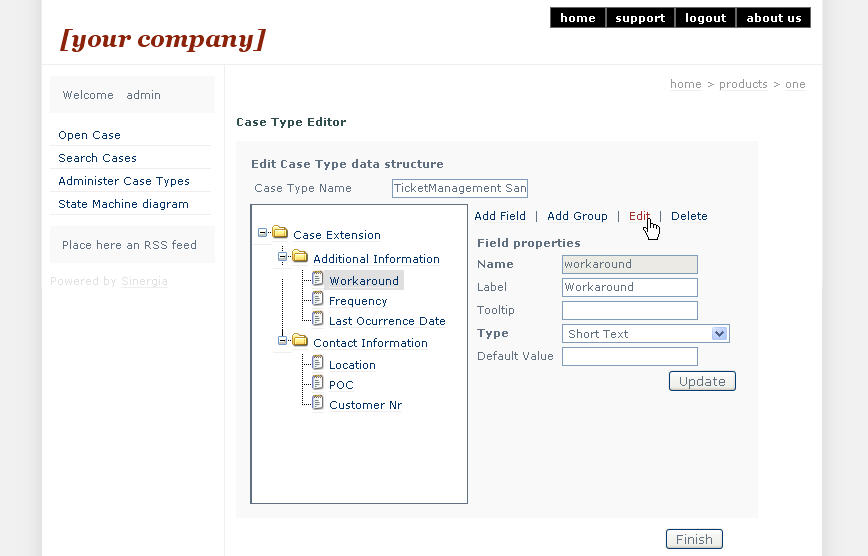
The latest release of the Sinergia project includes support for case customization. This can be achieved with the product Case Type management feature.
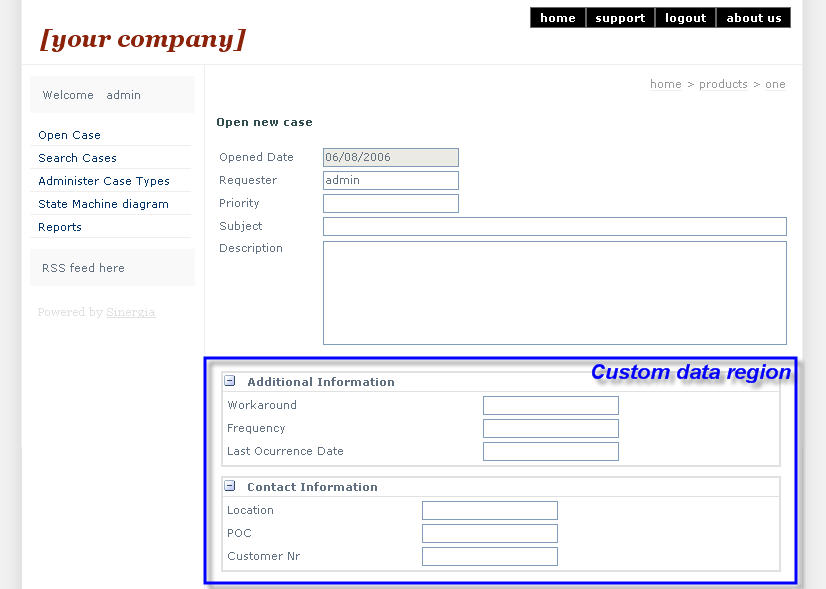
The Sinergia application allows for partial customization of the Case data. There are some header fields that are static, while there's a region for custom data.
Since the 20060801 release this feature can be accesed by the administrator role, in the "Administer Case Types" menu option, of the administrator profile.
The mechanics for creating a new Case Type, in the current version, are the following :
Currently not all control types are supported, but they will.
The Sinergia application allows for partial customization of the Case data. There are some header fields that are static, while there's a region for custom data.
Since the 20060801 release this feature can be accesed by the administrator role, in the "Administer Case Types" menu option, of the administrator profile.
The mechanics for creating a new Case Type, in the current version, are the following :
- First you create a new Case Type, by defining groups, and fields, with the help of a tree view control, in a GUI like the shown in the picture below.
- Then you explicitly generate the files for the created case type.
- Finally you set it as the default case type, to enable Case creation, with the newly defined custom data.
Currently not all control types are supported, but they will.
Saturday, July 29, 2006
Source file available for the pre alpha release
I decided to add a zip with the sources of the .net solution to the release's files, for those wanting to compile and run, without a cvs client out there.
With the following software installed, you should have no problem compiling and running the solution. The software would be:
* Visual Studio 2005 [Express]
* SQL Server 2000, or 2005
*Microsoft Pre-Release Software Microsoft .NET Framework 3.0 - June 2006 CTP
* Enterprise Library for .NET Framework 2.0 - January 2006
You can download it from here
enjoy
With the following software installed, you should have no problem compiling and running the solution. The software would be:
* Visual Studio 2005 [Express]
* SQL Server 2000, or 2005
*Microsoft Pre-Release Software Microsoft .NET Framework 3.0 - June 2006 CTP
* Enterprise Library for .NET Framework 2.0 - January 2006
You can download it from here
enjoy
Monday, July 24, 2006
Pre alpha release updated, again
This time the update changes are these:
1 - Delay activity InitializeTimeoutDuration handler modified to take this answer into account. The result of this is that now the Postponed state sleeps the time it's supposed to. (thnxs tom lake).
2 - Modified WCF configuration (establishSecurityContext="false") to avoid a very annoying behaviour, which was that after ten WCF invocations everything stopped working.
Any feedback?
1 - Delay activity InitializeTimeoutDuration handler modified to take this answer into account. The result of this is that now the Postponed state sleeps the time it's supposed to. (thnxs tom lake).
2 - Modified WCF configuration (establishSecurityContext="false") to avoid a very annoying behaviour, which was that after ten WCF invocations everything stopped working.
Any feedback?
Subscribe to:
Posts (Atom)